
/ When the Cloud Burns /
When the Cloud Burns: Zero-Trust Digital Signage for a World That Breaks
What 20 years of engineering looks like when cloud infrastructure disappears overnight. A technical deep-dive for IT decision makers, CISOs, and AV integrators.
March 2026. AWS experienced a major infrastructure event. The theoretical risk became a documented fact.
March 2026. The Week Everything Changed.
In March 2026, AWS experienced a major infrastructure event. Multiple data centers became unavailable simultaneously. Everyone in the industry knows what happened.
Organizations that built on a single cloud provider discovered the limits of that decision overnight. The conversations that followed changed how the industry thinks about cloud dependency.
IT teams watched years of cloud-first investment disappear overnight. No gradual degradation. No warning. No failover for those who had not prepared.
This was the first time a major hyperscaler's physical infrastructure was destroyed in a way that no software-level redundancy could compensate for. The theoretical risk that every architect mentioned in passing during DR planning meetings became a documented fact.
Every organization is now asking the same question: how do we build systems that survive this?
This article answers that question for digital signage. But the architectural principles apply far beyond screens on walls.
Digital Signage Is Critical Infrastructure. Treat It Like One.
Digital signage runs 24/7 in airports, hospitals, stadiums, government buildings, corporate campuses, and metro stations. It displays flight information, emergency alerts, wayfinding, operational dashboards, and safety instructions.
When screens go dark during a crisis, people lose navigation. Emergency messages do not reach the audience. Evacuation instructions disappear. Information boards show nothing when information matters most.
Most signage platforms were designed for normal conditions. Stable internet, reliable cloud, safe environment. The player is a thin client. Content streams from a server. Cut the connection: black screen.
That approach worked fine for ten years. It does not work anymore.
Three Principles of Resilient Signage
1. Offline-First
Every SpinetiX player stores all content locally. Templates, media, schedules, cached data. The cloud distributes and manages. It is not a dependency.
Connected: the player syncs, receives updates, reports status. Disconnected: nothing changes for the audience. Same content, same quality, same schedule. The player does not know the difference because local playback is the primary mode. Cloud is a management convenience.
No black screens. No error messages. No loading spinners. No degraded mode. Normal operation continues.
2. Zero-Knowledge Data Brokering
Enterprise deployments show live data on screens. PowerBI dashboards. SharePoint feeds. Google Workspace calendars. This data is often sensitive. Revenue numbers, HR information, operational KPIs.
The industry standard: the signage cloud connects to the enterprise source, pulls the data, stores it, processes it, pushes it to the player. Your business intelligence now sits in a third-party cloud. One more system to audit. One more breach surface. One more compliance headache.
The SpinetiX HUB works differently. It acts as a token broker. Authenticates with the data source. Generates a one-time access key. Hands the key to the player. The player connects directly to PowerBI, Google, or SharePoint and pulls data itself.
The signage cloud never sees the data. Never stores it. Never processes it.
Think of a hotel concierge who books a restaurant table for you. The concierge makes the reservation. But your dinner conversation stays between you and your guests. The concierge is not at the table.
— The HUB token-broker pattern explained
Security Implication
If the signage cloud is compromised, breached, or destroyed, enterprise data was never there. Nothing to leak. Nothing to lose. Nothing to explain to the regulator. Attack surface for sensitive data: zero.
3. Graceful Degradation by Design
Every content template is built with feed failure in mind. When PowerBI is unreachable, the widget does not show an error. It does not leave a blank space. The layout adapts. The rest of the content fills the screen naturally.
No blue screens. No frozen charts. No "connection lost" banners. The audience sees a clean, complete screen regardless of what is happening behind it.
This is a design discipline enforced at template level. Every layout answers one question before it ships: what does this look like when everything is offline? The answer is always: it looks fine.
Deep Engineering vs. Cloud Wrappers
These three principles did not appear in a product roadmap after the March events. They were built into the SpinetiX platform from the beginning. The DSOS operating system on the player is a hardened, purpose-built operating system with read-only filesystem, secure boot, and no open ports. Content runs locally because the architecture was designed that way two decades ago.
New signage platforms appear every year. Cloud-native, subscription-priced, feature-rich. Nice dashboards. Easy onboarding. But underneath: a thin client player that streams everything from a single cloud instance.
That difference between a deep engineering ecosystem and a quick cloud wrapper is invisible during normal operations. Both work fine on a Tuesday afternoon.
The difference becomes visible the morning your cloud provider goes offline overnight.
SpinetiX is a full ecosystem from a single vendor. Players with hardened firmware. ARYA cloud CMS. HUB for secure data integration. Elementi for on-premise management. Hardware, software, cloud, local tools — all engineered together. Not assembled from third-party parts. Not dependent on someone else's uptime promises.
And when something needs attention, there is a local engineering team. Not an overseas call center. Not a ticket queue in another timezone. Engineers who know the projects and the people.
How Data Flows: What Touches What
Normal Day
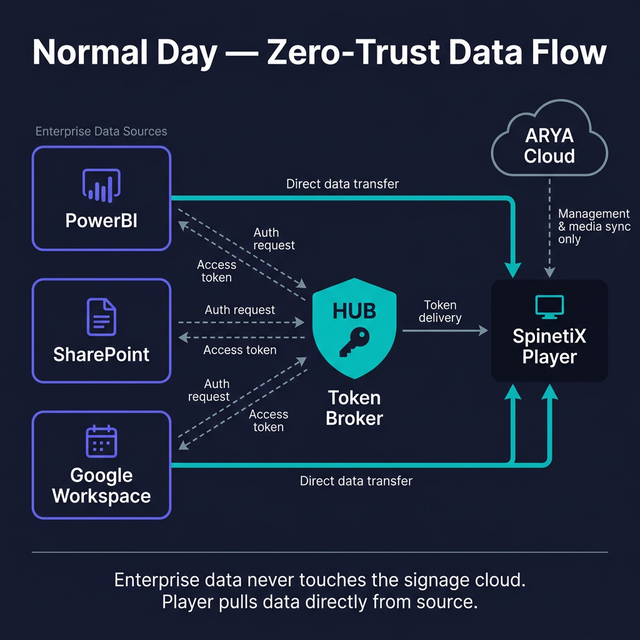
Token Broker Architecture
Enterprise data flows from source to player via HUB token broker. The signage cloud handles management and media only. PowerBI, SharePoint, and Google Workspace data never enters the signage platform — the player connects directly to the enterprise source using a one-time access key.
What ARYA Stores
Media files, layout templates, scheduling rules, player configuration, hashed user credentials, audit logs. No PowerBI data. No SharePoint documents. No Google content. No enterprise business data of any kind.
Cloud Destroyed. Infrastructure Offline.
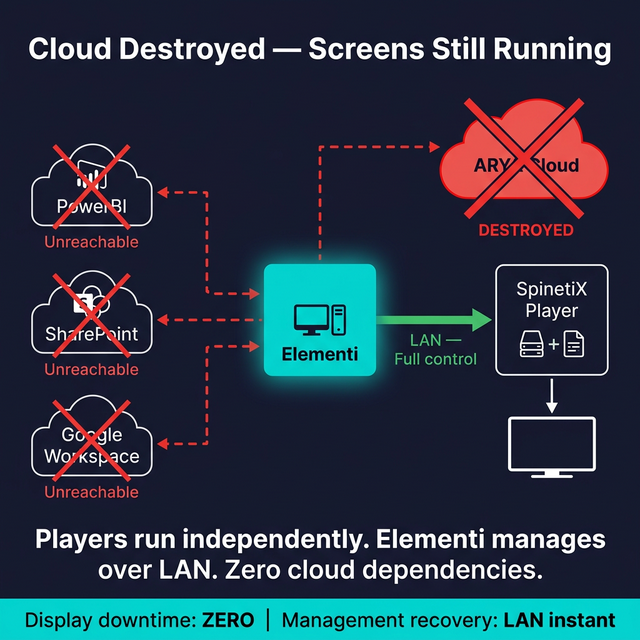
Offline-First Resilience
Screens keep running. All content plays from local storage. Live data widgets that lost their source disappear cleanly — no errors, no broken layouts. Elementi desktop application handles emergency content updates over LAN without internet. Zero audience impact.
The Emergency Management Tool Nobody Thinks About Until They Need It
Elementi is a desktop application. Connects to SpinetiX players directly over the local network. No cloud authentication. No internet connection. Full content creation, editing, and deployment.
When the cloud is gone, Elementi becomes the command center:
- ▸ Push emergency alerts to every player on the network. Seconds, not minutes.
- ▸ Create and deploy new content without internet.
- ▸ Change schedules and playlists on the fly.
- ▸ Update wayfinding, safety instructions, navigation.
- ▸ Replace live-data templates with pre-built static packages.
Airports need evacuation notices during connectivity loss. Hospitals need wayfinding when networks are down. Corporate buildings need emergency alerts when cloud providers are offline. Elementi delivers all of that over LAN.
Every customer should have Elementi installed on at least one workstation in the same building as the players. Fire extinguisher logic: you hope you never need it. But when you do, it must work instantly with zero dependencies.
March 2026 Validation
SpinetiX ARYA, HUB, and Elementi have maintained continuous operation throughout the March 2026 events. Zero seconds of downtime on display networks. Zero loss of management capability. This is not a resilience claim. It is a production fact.
Why Regulators Should Love This Architecture
Every CISO and compliance officer is under pressure right now. Data sovereignty audits. Cross-border transfer reviews. Emergency assessments of where enterprise data went during hasty cloud migrations.
The UAE PDPL, Saudi PDPL, DIFC and ADGM frameworks all ask the same questions: where is data stored? Where is it processed? Who has access? For most signage platforms, these are hard questions. Enterprise data flows through the vendor's cloud, stored in regions you may not control.
For the SpinetiX architecture, the compliance conversation is short:
| Data Type | Location | In Signage Cloud? | Compliance Impact |
|---|---|---|---|
| PowerBI dashboards | Microsoft + player cache | No. Token only. | No third-party transfer |
| SharePoint content | Microsoft + player cache | No. Token only. | No third-party transfer |
| Google Workspace | Google + player cache | No. Token only. | No third-party transfer |
| News / RSS feeds | Source + player cache | No | No personal data |
| Signage media | ARYA Cloud + player | Yes | Media, not personal data |
| Player telemetry | ARYA Cloud | Yes | Device metrics only |
| User credentials | ARYA Cloud (hashed) | Hashed only | Minimal PII, AES-256 |
| Audit logs | ARYA Cloud | Yes | Standard retention |
The data regulators care about most — business intelligence, internal dashboards, operational metrics, employee information — never enters the signage cloud. Direct path: enterprise source to player. The signage platform issues access keys. That is all.
When IT security asks to map your data flow, show them this table. Five-minute meeting. Not a five-week audit.
For operational data in ARYA Cloud: configurable residency (EU, Switzerland, US), AES-256 GCM at rest, TLS 1.2/1.3 in transit.
Two Different Worlds
| Scenario | Cloud-Dependent CMS | Offline-First (SpinetiX) |
|---|---|---|
| Cloud infrastructure physically destroyed | All screens dead. No management. | Screens run normally. Elementi over LAN. |
| Internet lost at the building | Content stops. Screens freeze. | Local playback. No visible change. |
| Emergency alert needed, no cloud | Impossible | Elementi pushes via LAN in seconds |
| PowerBI / Google unreachable | Broken widget, error on screen | Widget hidden. Layout stays clean. |
| Urgent content change during outage | Wait for cloud recovery | Full creation and deployment via Elementi |
| Compliance audit after incident | Complex: data scattered during migration | Clean: enterprise data never in signage cloud |
| Recovery time | Hours to weeks | Zero. Screens were never down. |
The right column is not aspirational. It is what happened this month across SpinetiX deployments.
How a Resilient CMS Management Layer Should Be Built
Display networks survive without cloud — that part is architecture, not infrastructure. But restoring remote management after a regional failure matters. Here is what a properly designed CMS cloud layer looks like. This is how the ARYA platform is built by default.
Industry Reference: Cloud DR Architecture
- ▸ Real-time database replication across regions (ARYA uses DynamoDB Global Tables). If one region is destroyed, data already exists elsewhere. No manual backup. No restore window.
- ▸ Cross-region media replication (ARYA uses S3 CRR). All content synced continuously. A region loss does not mean re-uploading terabytes of media.
- ▸ Automatic DNS failover (ARYA uses Route 53). Health checks detect failure, DNS switches to backup region in under 2 minutes. No human intervention.
- ▸ CDN-level origin failover (ARYA uses CloudFront Origin Groups). Transparent to players and users. CDN serves from whichever region is alive.
- ▸ Infrastructure as Code (ARYA stack defined in CDK). Entire platform re-deployable from scratch in any region. Do not wait for damaged facilities to recover.
SpinetiX Users: This Is Already Done For You
ARYA Cloud includes multi-region DR by default. You do not need to build, configure, or maintain any of the above. It is part of the platform. If your current CMS vendor does not offer this — ask them why.
Two Checklists. Two Audiences.
For SpinetiX Users
Your Checklist. You're Already Safe — Just Do These.
You chose SpinetiX. The hard engineering is done. These operational steps take minutes and give you complete confidence.
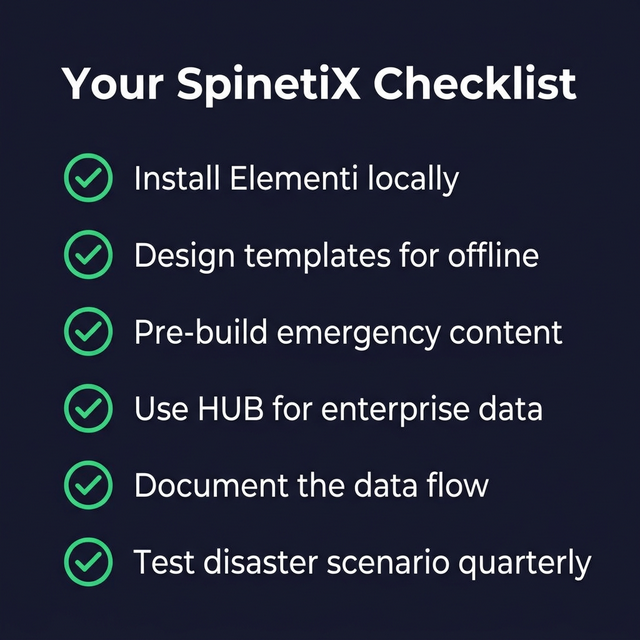
Install Elementi near your players
One workstation, same building, same network. Your emergency tool — works without internet.
Design every template for feed failure
Pull the cable. If you see an error — fix the template. Every screen must look clean offline.
Pre-build emergency content
Evacuation alerts, safety notices, static fallback. Built in Elementi. Deployable in two clicks.
Use HUB for enterprise data
Token broker pattern. PowerBI stays between Microsoft and the player.
Document the data flow
Print the compliance table. 5-minute meeting when security asks.
Test a disaster scenario
Disconnect, push emergency content via Elementi. 30 min. Quarterly.
For CMS Vendors & IT Architects
What Resilient Digital Signage Architecture Looks Like
If your CMS vendor cannot check every box below, you have a gap. These are not premium features — they are baseline requirements for mission-critical deployments.
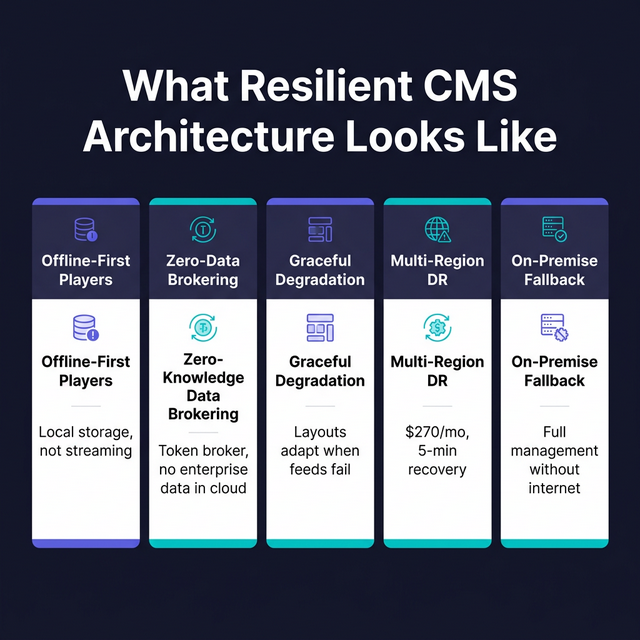
Offline-first player architecture
Content runs locally. Cloud manages, not delivers. Black screen during outage = failure.
Zero-knowledge data brokering
Enterprise data never enters CMS cloud. Token broker only. Cloud breach = nothing to leak.
Graceful degradation by design
Templates adapt when feeds fail. No errors. No broken widgets. Clean screen, always.
Multi-region DR for management
DB replication, media sync, DNS failover, IaC. ~$270/mo. Under 5 min recovery.
On-premise management fallback
Full content creation and deployment over LAN. No internet. No cloud auth.
SpinetiX checks every box. It has for twenty years.
The Choice Made Years Ago
The organizations that survived March 2026 without service interruption have one thing in common:
Someone, at some point, chose a system built for resilience over a system built for convenience.
That choice looked conservative at the time. More expensive upfront. Less flashy dashboard. Fewer cloud-native buzzwords. Why pay for offline capability when the cloud is always up?
The cloud is not always up.
Buildings burn. Data centers get hit. Regions go dark. The question is not whether it happens. The question is whether your screens stay on when it does.
This is not about one vendor versus another. It is about an architectural philosophy. Systems designed to be self-sufficient at the edge, with zero-trust data handling and full local management capability, survive events that cloud-dependent systems cannot.
The SpinetiX ecosystem was built on that philosophy twenty years ago. Players, cloud, data broker, on-premise tools — all from one vendor. All engineered together. All tested in the hardest conditions the industry can offer.
It is working. Right now.
Frequently Asked Questions
What happens to digital signage when the cloud goes down?
Does SpinetiX store enterprise data in its cloud?
How do you manage digital signage without internet?
Is SpinetiX compliant with UAE and Saudi data protection laws?
How much does disaster recovery cost for ARYA Cloud?
Published by
Media La Vista FZCO
SpinetiX Master Distributor. 20 years of digital signage deployment experience. Engineering, support, and training — on the ground, in your timezone.
Build Resilient Signage Infrastructure
Talk to our engineering team about offline-first architecture, security compliance, and disaster recovery for your display network.